

DSG SWAP ELECTRONICS
CAN Convertor DSG
Modern DSG gearbox. Classic vehicle electronics. Connected.
Integrate the essential functions of a supported Volkswagen Group DSG transmission into an older vehicle. Add paddle shifting, retain a compatible VSS speedometer, operate reverse lights and starter-interlock relay circuits, and configure the system over built-in Wi-Fi.
See current pricing and availability in our shop.
For supported DSG swap projects. Confirm your gearbox, ECU and required functions before ordering.

CAN Convertor DSG · module and wiring loom
BUILT FOR DSG SWAPS
Essential functions. One compact interface.
Digital & LIN paddle shifting
Add upshift and downshift switches, or configure supported LIN v1/v2 steering-wheel paddles.
Keep a compatible speedometer
Turn a supported speed source into a VSS-style output for compatible older instrument clusters.
Reverse light & starter relay
Integrate a 12 V reverse-light output and a ground-switched starter-interlock relay control.
Configure over Wi-Fi
Adjust settings, inspect live data and update firmware through the built-in browser interface.
SIGNAL INTEGRATION
Bridge modern DSG communication with classic vehicle electronics.
The CAN Convertor DSG connects supported DSG CAN communication to the vehicle signals that commonly need attention during a conversion. It is an integration interface; the DSG retains its own transmission control unit.
01 · Vehicle inputs
Shift paddles, a compatible speed input and an optional brake signal feed into the converter.
02 · CAN Convertor DSG
Configurable CAN communication and input/output settings translate the required signals.
03 · DSG & vehicle outputs
Communicate with a supported DSG and provide VSS, reverse-light and starter-relay control outputs.
Simplified functional overview. Follow the installation manual for connector orientation, wiring and relay connections.
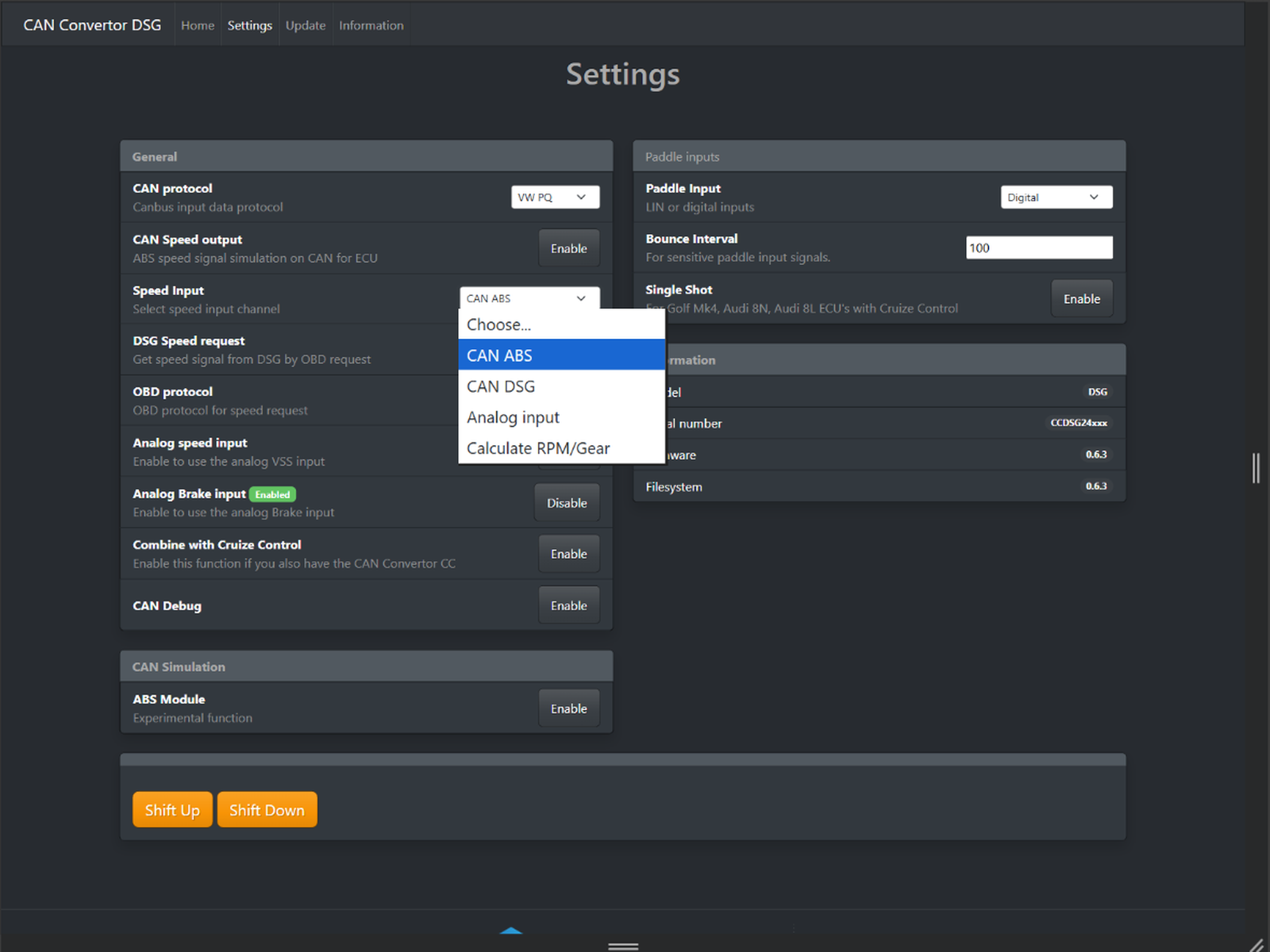
Original device interface · four configurable speed sources
SPEED SIGNAL CONVERSION
Use the speed source available in your swap.
Keep a compatible VSS speedometer
Convert a supported vehicle-speed source into a VSS-style signal for compatible older instrument clusters. Product information specifically mentions Golf Mk3 and Mk4 speedometers.
CAN ABS — speed from a supported ABS CAN network.
CAN DSG — diagnostic speed requests from a supported gearbox.
Analog input — compatible external 12 V Hall-effect VSS sensor.
Calculate RPM/Gear — estimated speed from engine RPM and selected gear.
Direct DSG speed availability depends on the transmission, communication support and configuration.
DIGITAL & LIN INPUTS
Add the paddle controls that suit your build.
From simple switches to supported steering-wheel paddles
Dedicated ground-switch inputs provide Shift Up and Shift Down commands. For supported OEM paddle arrangements, select the appropriate LIN mode in the web interface.
Available input modes
Digital · LIN v1 Master · LIN v2 Master · LIN v1 Slave · LIN v2 Slave
Adjustable debounce (“Bounce Interval”) and the optional Single Shot setting help tailor input behaviour. Single Shot is relevant to certain Golf Mk4, Audi 8L and Audi 8N cruise-control configurations.
Confirm the specific steering-wheel module and vehicle configuration before installation.
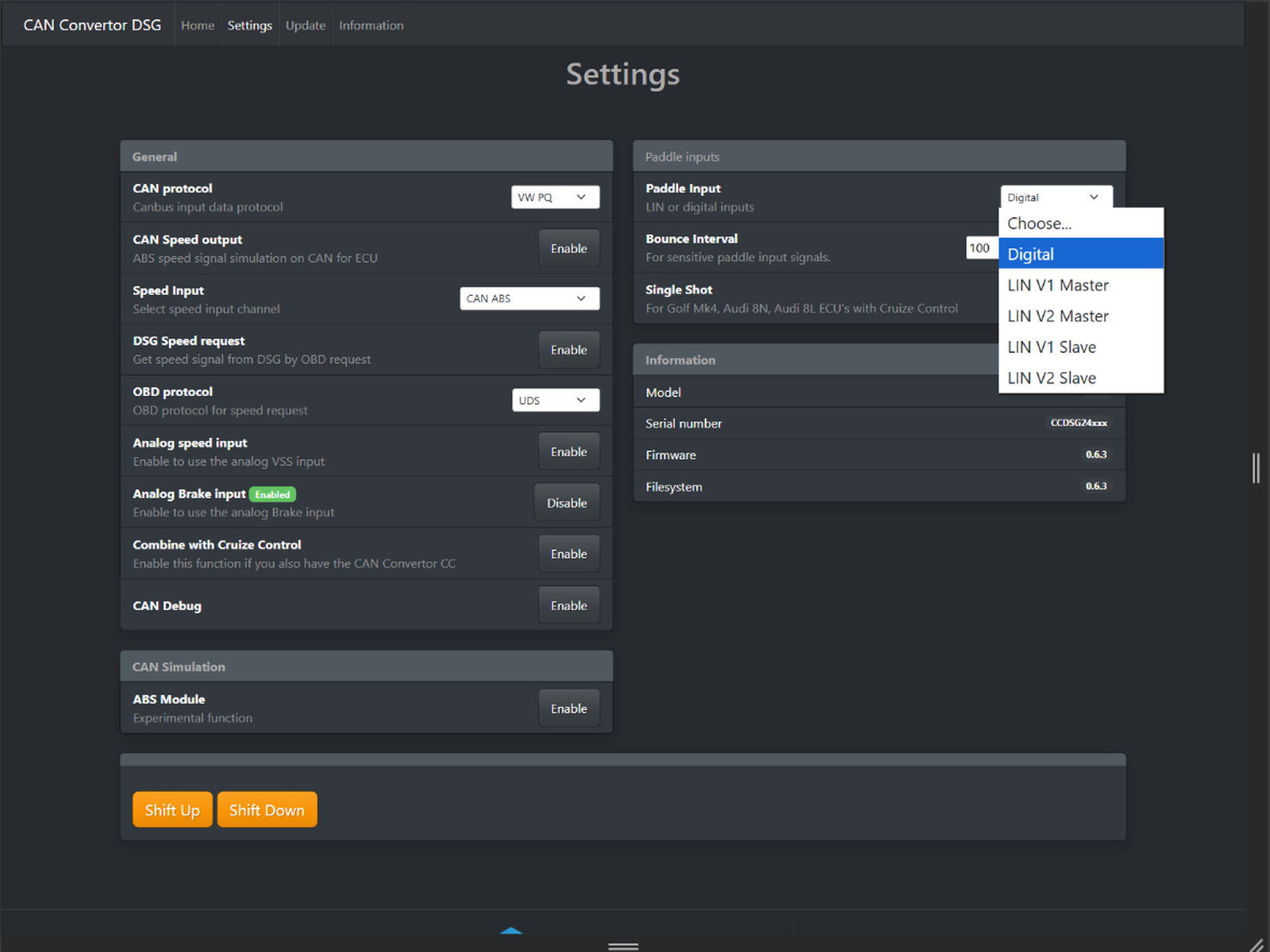
Original device interface · digital and LIN v1/v2 master/slave selection
PQ / MQB · UDS / TP2.0
Match CAN communication to your supported DSG setup.
Choose VW PQ or VW MQB CAN data and select UDS or TP2.0 for supported DSG speed requests. These settings are configuration options, not a universal gearbox compatibility guarantee.
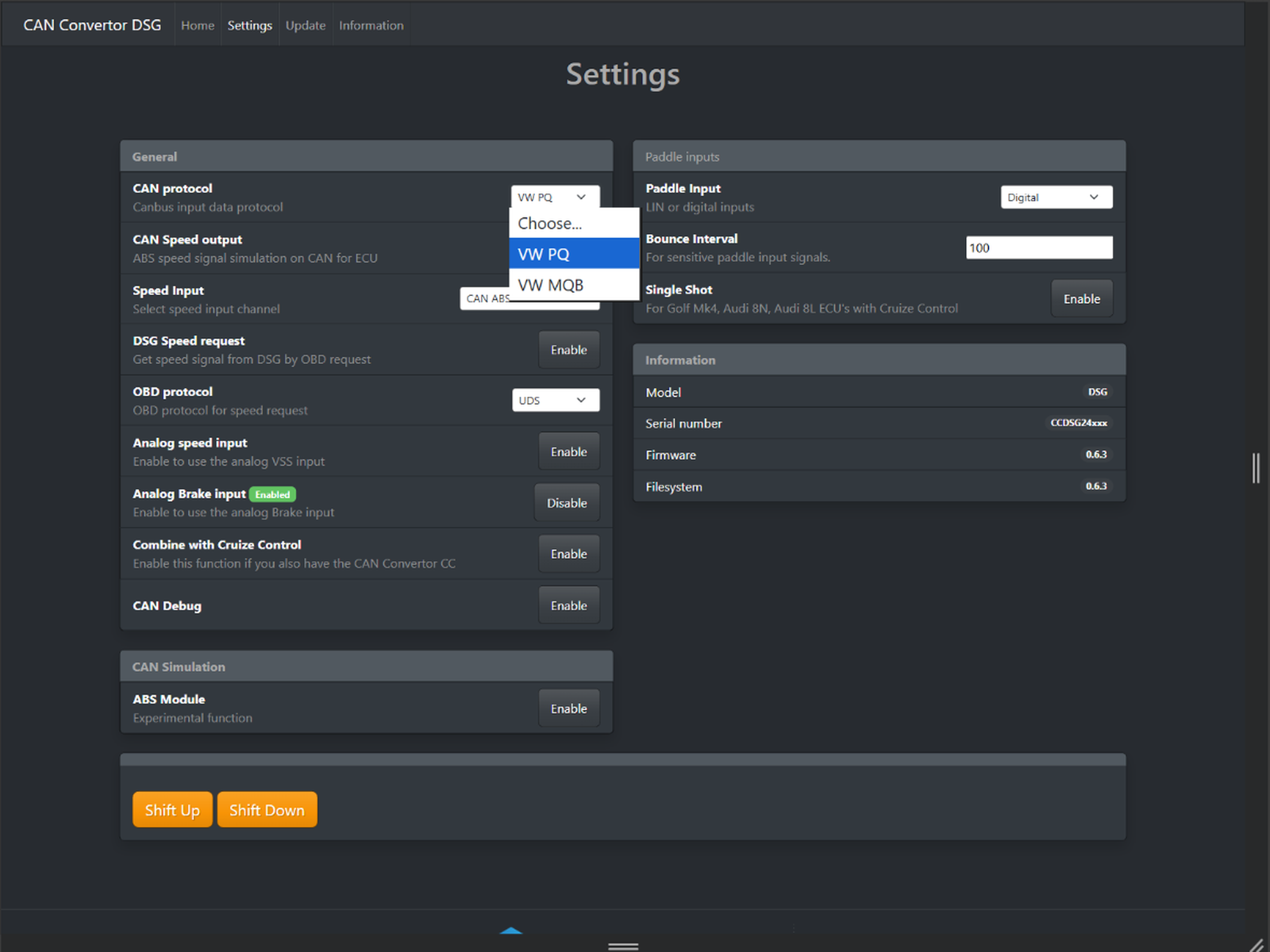
Original device interface · VW PQ / VW MQB
PQ / MQB CAN selection
Select the CAN protocol appropriate to the supported vehicle network and transmission setup.
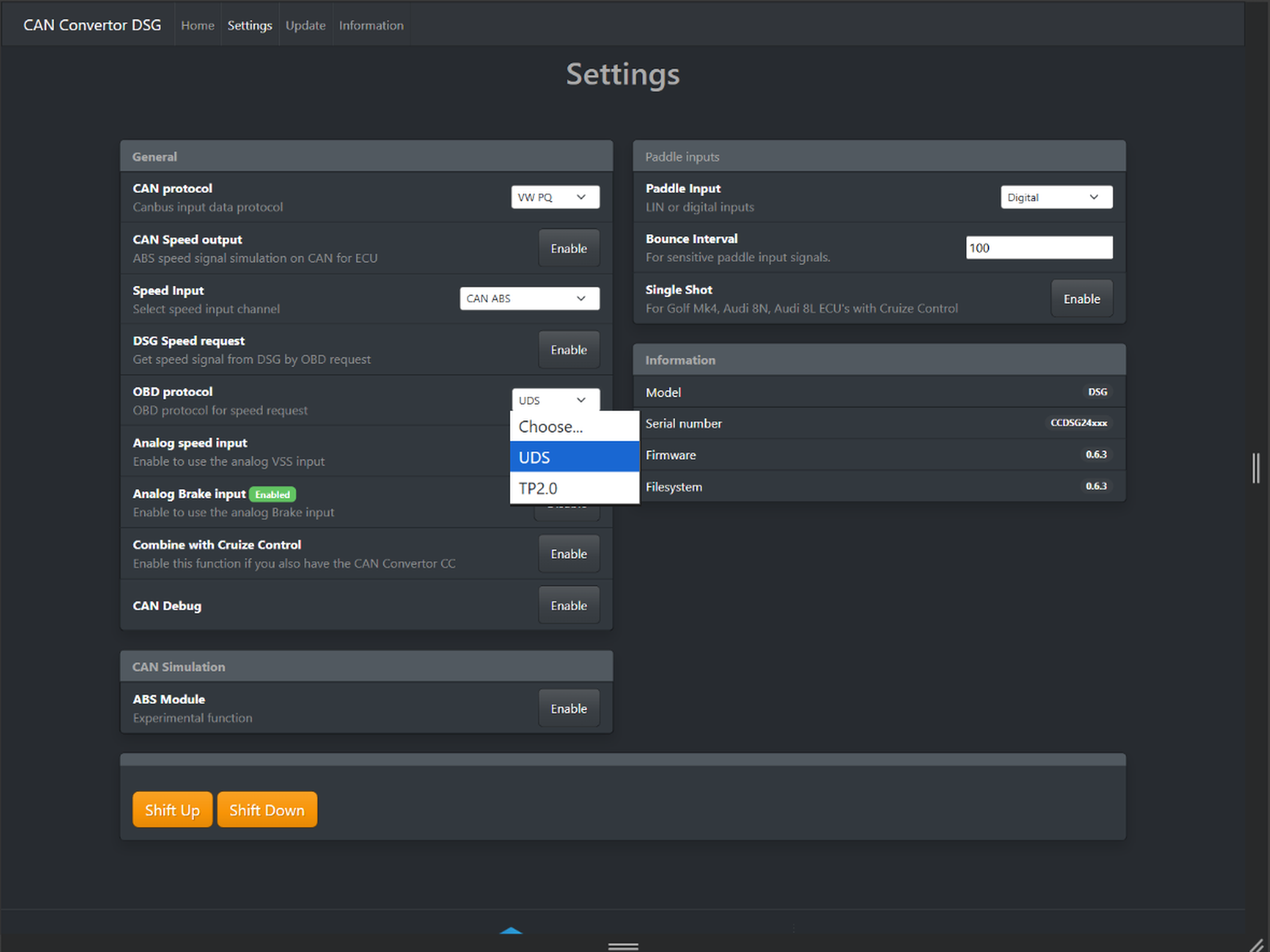
Original device interface · UDS / TP2.0
DSG diagnostic speed requests
Use the request protocol supported by the gearbox. Speed retrieval depends on the exact transmission, TCU and firmware.
BUILT-IN WEB INTERFACE
Configure, monitor and troubleshoot in your browser.
Connect a phone, tablet or laptop to the module’s Wi-Fi network and open its integrated web interface. No separate desktop configuration application is required for these settings.
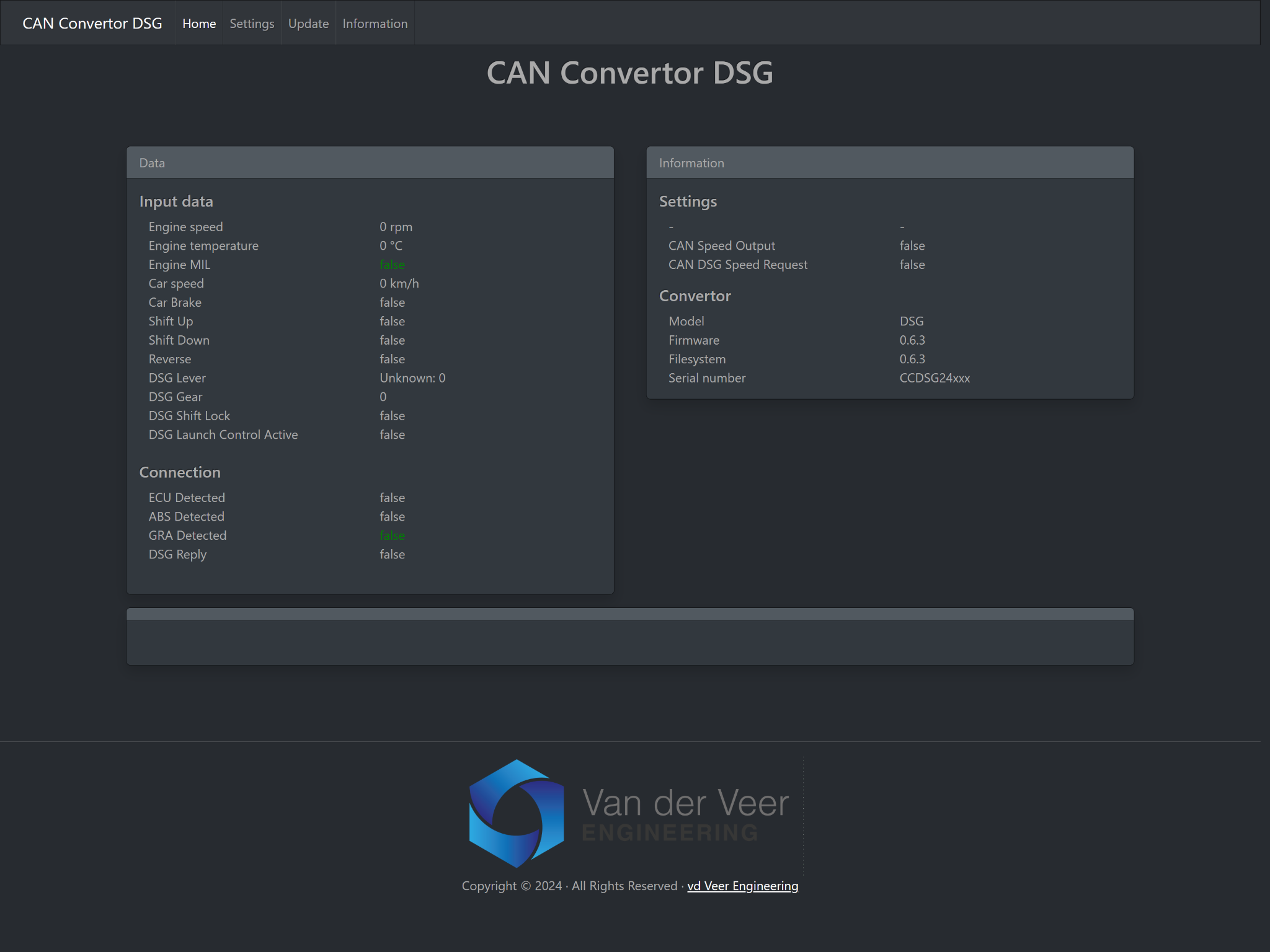
Original Home dashboard · firmware v0.6.3
See the signals your setup is providing
Inspect available engine speed and temperature, vehicle speed, brake status, paddle commands, reverse status, DSG selector and actual gear, shift-lock status and launch-control state.
ECU, ABS, GRA and DSG communication indicators help identify missing network signals during commissioning. Values depend on the connected vehicle and operating conditions.
Practical configuration in one place
Set CAN protocol, speed source, DSG diagnostic requests, UDS/TP2.0, analog speed and brake inputs, CAN speed output, paddle mode, debounce and Single Shot behaviour.
The interface also includes Shift Up and Shift Down test commands, CAN Debug and cruise-control-related settings. Follow the installation instructions when commissioning the system.
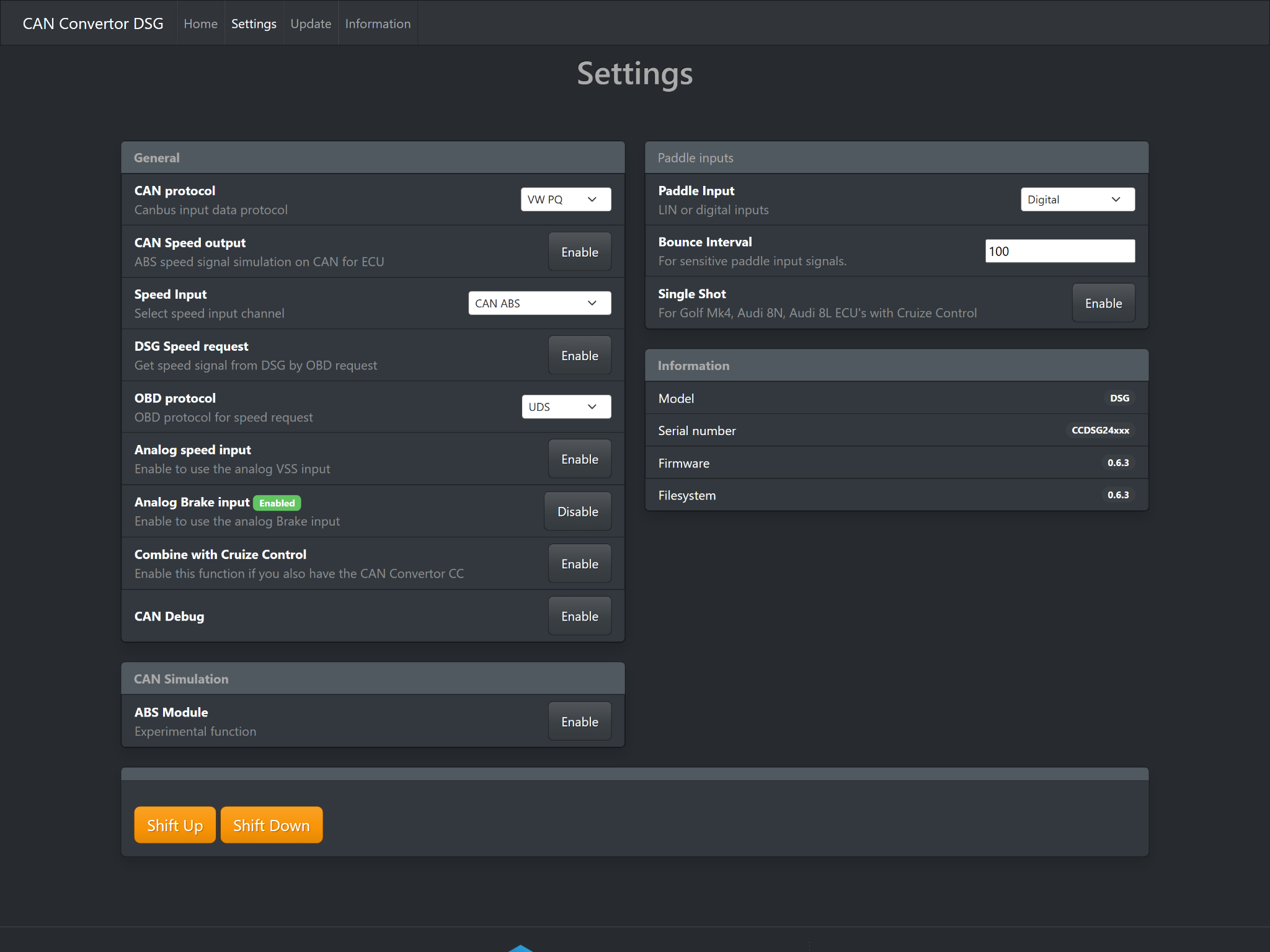
Original Settings screen · CAN, vehicle speed, paddles and I/O
ADVANCED CONFIGURATION
More tools for demanding conversions.
Explore configuration and diagnostic functions documented through firmware v0.6.3. Advanced features depend on your vehicle and ECU configuration.
ME7 / GRA improvements
v0.6.3 adds automatic ME7 GRA CAN-data detection and fixes a cruise-control-enabled condition that disabled CAN. Some ME7/cruise-control combinations can still interfere with paddle commands; confirm your setup.
CAN debugging & logging
Use CAN Debug to inspect network communication. Firmware v0.6.3 also adds a CAN logger for advanced troubleshooting. Contact us to confirm whether its logging functions meet your installation requirements.
CAN ABS speed simulation
Supported ECU-oriented speed simulation is documented, with v0.6.3 adding ABS simulation for launch-control applications. The ABS Module function is marked experimental.
Firmware v0.6.2 adds actual DSG gear display for PQ and MQB. v0.6.0 adds a companion CAN Convertor CC combination function, shown as “Combine with Cruise Control” in settings.
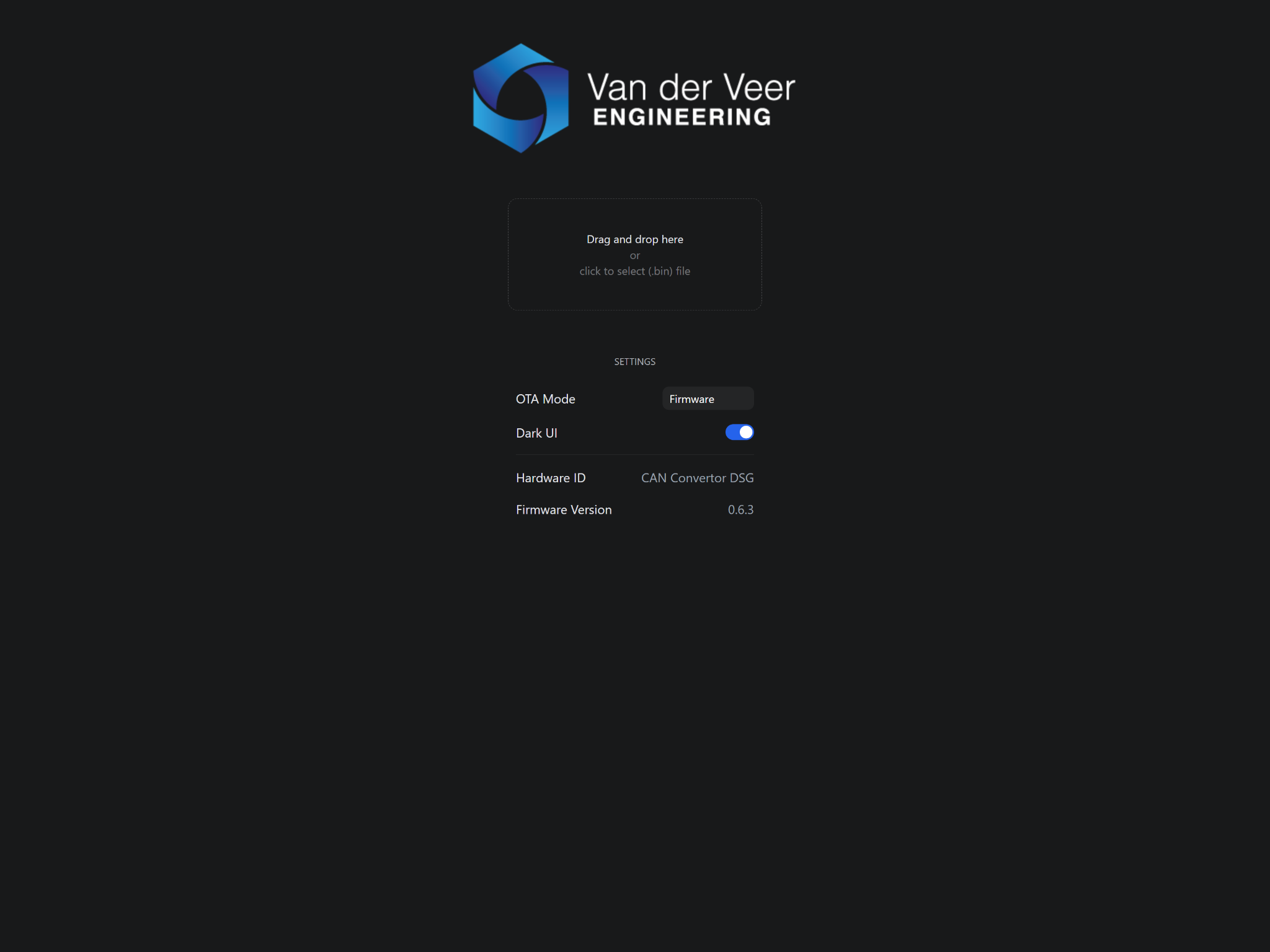
Original updater interface · firmware and hardware information
WI-FI FIRMWARE UPDATING
Keep your converter’s firmware up to date.
Upload the correct firmware from your browser
Connect to the device’s Wi-Fi network and use the built-in updater to select a compatible .bin firmware file. The interface displays device and firmware information.
The interface shown uses firmware v0.6.3. The accompanying release notes document changes through this version, released on 23 December 2025.
Only install firmware intended for your exact product. Follow the update instructions and keep power stable during the update.
Read firmware release notesCHECK YOUR INSTALLATION
Choose by gearbox, TCU and required functions.
Designed for supported VW PQ and MQB DSG setups. Gearbox family alone does not establish compatibility: confirm the exact transmission, TCU, CAN environment and functions you need.
VW PQ · DQ250 / DQ500
Check the gearbox’s CAN implementation, required vehicle signals and chosen speed source.
VW MQB · DQ250 / DQ500
Check the exact transmission and TCU, especially for MQB DQ500 applications. Confirm communication support and the functions required for your installation before ordering.
Older DSG variants may require different speed request methods. Steering-wheel LIN hardware and ME7 cruise-control configurations also need individual checks. For complex network integration, ask whether the full DSG Controller is a better fit.
Ask about your vehicle, ECU & gearboxINSTALLATION REFERENCE
Inputs, outputs and connector wiring.
Inputs
Shift Up and Shift Down ground-switch inputs
LIN bus paddle input
Compatible 12 V Hall-type VSS input
Optional 12 V brake input
CAN High / CAN Low
Outputs
VSS-style speedometer signal
12 V reverse-light output
Ground-switched starter-block relay control
Configured CAN speed simulation
Power & configuration
Switched 12 V supply and ground
Wi-Fi browser interface
VW PQ / VW MQB CAN selection
UDS / TP2.0 speed requests
Firmware upload and diagnostics
Connector pin reference
Verify connector orientation and the complete wiring arrangement against the installation manual. The starter-block output controls a relay; it must not carry starter-motor current.
Power & communication
Pin 1 · Orange / Black
CAN High
Pin 6 · Black / Purple
Switched 12 V supply
Pin 7 · Orange / Brown
CAN Low
Pin 12 · Brown
Ground
Control inputs
Pin 3 · White
Optional brake input, 12 V
Pin 5 · Grey
LIN bus
Pin 9 · Yellow
Shift Down, ground-switch input
Pin 10 · Green
Shift Up, ground-switch input
Vehicle outputs
Pin 2 · Brown / Blue
Starter-block relay control, ground output
Pin 4 · Blue / White
VSS speed output
Pin 11 · Black / Green
Reverse-light output, 12 V
Only pins identified in the supplied manual are listed. The manual does not identify a connector pin for the analog VSS input; confirm that connection for your hardware before installation.
Open installation manual (PDF)QUESTIONS & ANSWERS
Before you start your DSG swap.
Can I retain my original speedometer?
Yes, provided the cluster accepts the converter’s VSS-style output and a compatible speed source is configured. Mk3 and Mk4 speedometers are specifically mentioned in the product information.
Can it read DSG speed without another sensor?
On supported gearboxes, DSG speed requests use UDS or TP2.0 communication. CAN ABS, a compatible 12 V Hall sensor and RPM/gear calculation provide alternative speed sources. Confirm support for your exact gearbox.
Does it support LIN paddle shifting?
The supplied firmware interface offers LIN v1 and LIN v2 in Master and Slave modes, alongside digital ground-switch inputs. The specific steering-wheel paddle hardware still needs verification.
What about ME7 cruise-control interference?
Single Shot supports certain older VW/Audi configurations, and v0.6.3 adds ME7 GRA improvements. Some setups may still experience missed or double shifts and may need the full DSG Controller for more advanced network integration.
Does it control the entire gearbox?
It is a CAN bus and signal converter for key DSG swap integration functions. It does not replace the gearbox’s own transmission control unit or provide every function of the full DSG Controller.
How do I configure and update it?
Connect to the device’s Wi-Fi network and open its integrated browser interface. Use the installation manual for local access instructions, and upload only firmware supplied for your exact product.
YOUR NEXT DSG PROJECT
Connect the essential signals. Keep the swap moving.
Combine paddle shifting, compatible speedometer integration, reverse-light and starter-relay control with configurable CAN communication and built-in Wi-Fi setup.
Current pricing, availability and ordering are managed in our WooCommerce shop. Send your vehicle, ECU and gearbox details when requesting compatibility advice.